How to Install iTim Text Adhoc App
1. Save the two files attached to the email (one is a provision file and the other is a .IPA file)
2. Open iTunes, disconnect your iPhone/iPod. If you have a previous of copy of iTim installed on your device, delete it. Restart your device. Also, in iTunes, click on applications (top left) and delete the itim app icon if it is present.
3. Open the folder you saved the two files.
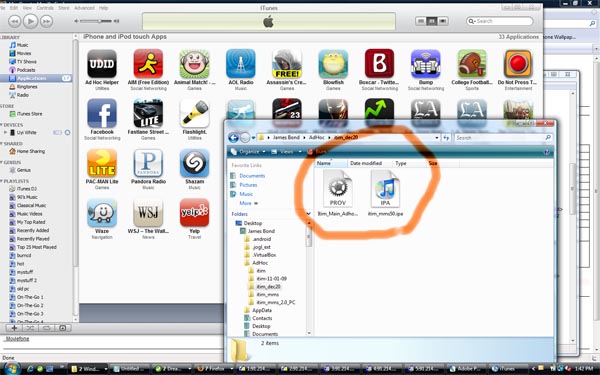
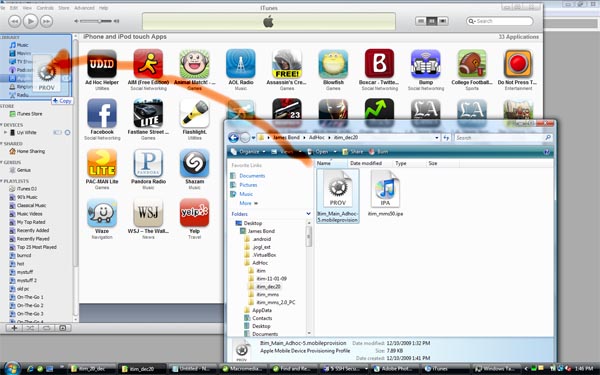
4. Drag the provision file into iTunes like the image below
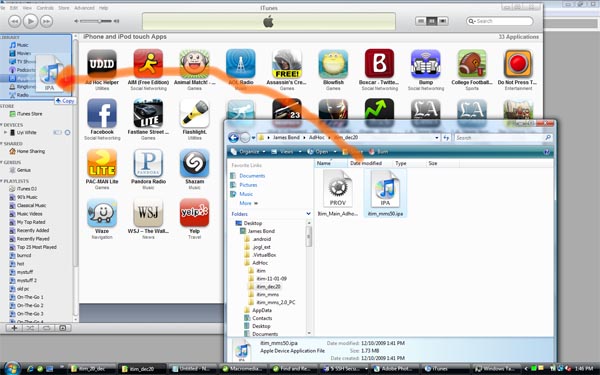
5. Drag the .IPA file into iTunes like the image below
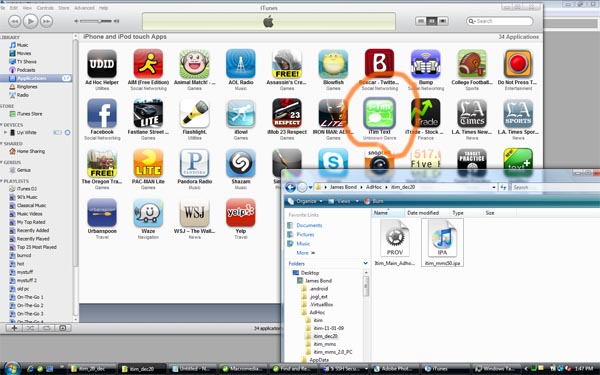
6. Click applications (top left), you should see the iTim App Icon (see image below)
7. Now connect your iPhone/iPod. Cancel the automatic sync if it starts.
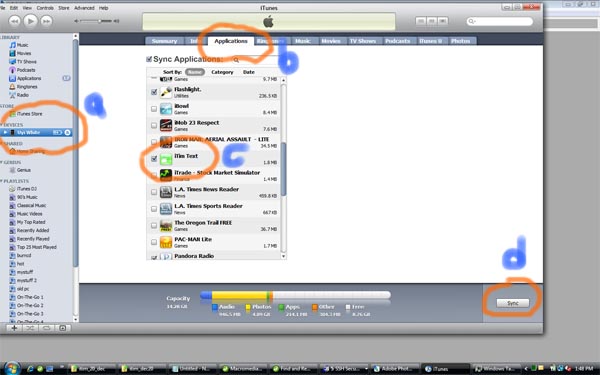
8. Check the following in the order below
-
A. click your device (step a in the image below)
-
B.
click the applications tab (top middle) - (step b in the image below)
-
C. Make sure iTim Text is checked (step c in the image below)
-
D.
click Sync / Apply - (step d in the image below)
9. Once syncing is completed, iTim Text should be installed on your device. Enjoy !!!!!